logo

World of Rental Help Center

Exact matches only
Search in title
Search in content
Search in posts
Search in pages
Filter by Categories
Add / View Leases
Applicants
Contacts/Vendors
Dashboard
Documents
Getting Started
Inspection
Manage Account
My Profile
Notifications
Properties
Recurring Tasks
Recurring Transactions
Reports
Security
Support
Tasks
Tenants
Tenants Assessment
Tenants with Access
Transactions
Transactions Types
Useful Links

Re-invite Tenant

May 20, 2016 by worldofrental

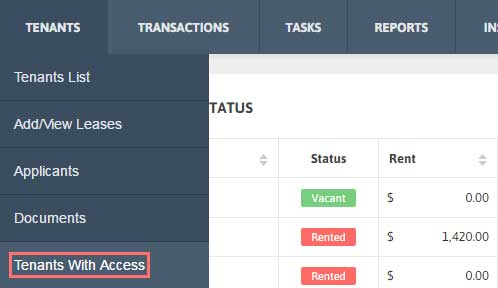
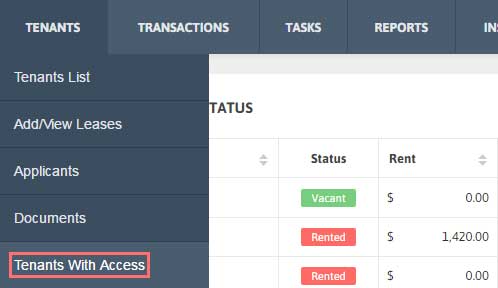
1. Click Tenants → Tenants with Access from the Menu.
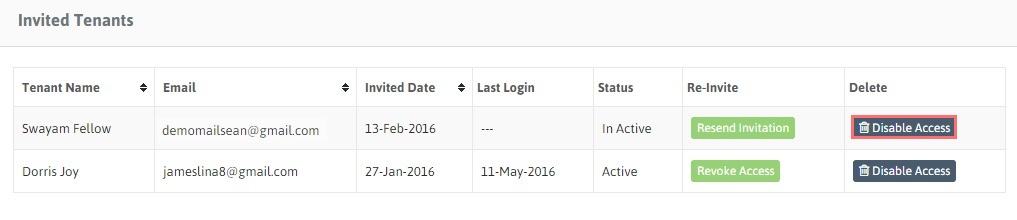
2. A table showing the details of the Invited Tenants will be reflected.
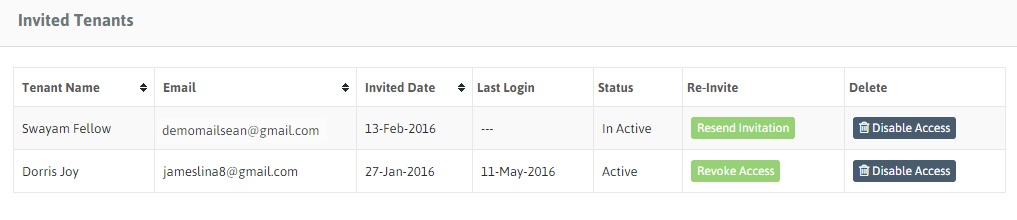
3. Click on ‘Re-send Invitation’ button under Re-invite tab for any tenant you wish to send reinvitation to join World of Rental.
Filed Under: Tenants with Access

Disable Access for Tenant

May 20, 2016 by worldofrental

1. Click Tenants → Tenants with Access from the Menu.

2. Click ‘Disable Access’ under Delete column to revoke your tenant’s access from World of Rental.
Filed Under: Tenants with Access

Add Document

May 20, 2016 by worldofrental

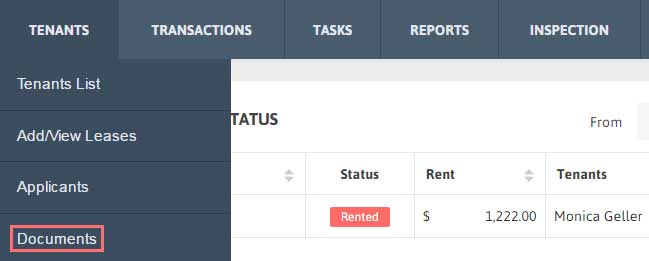
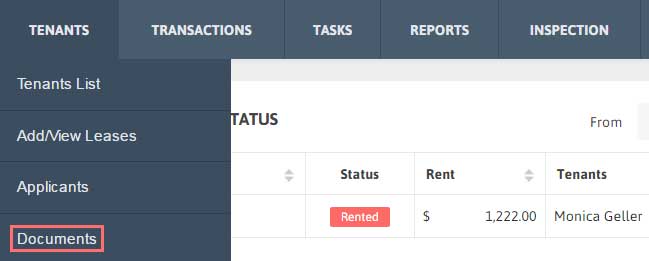
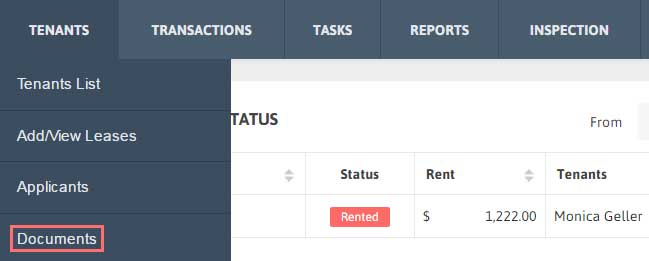
1. Click Tenants → Documents from the Menu.

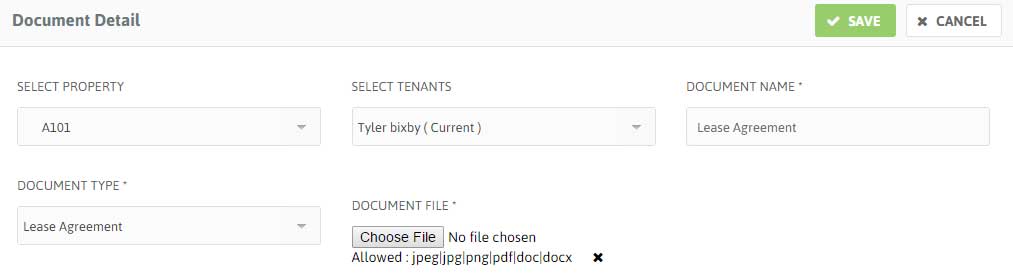
2. Click Add New. Fill the details of the Document and then Upload the document.

3. Click ‘Save’ button.

Filed Under: Documents

View Document

May 20, 2016 by worldofrental

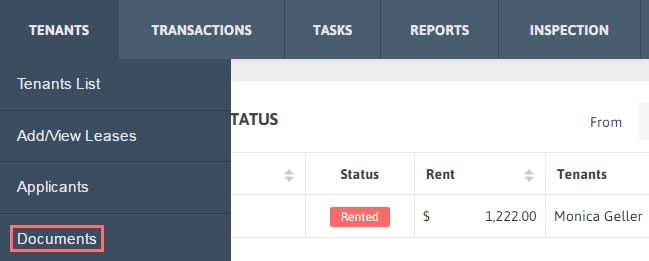
1. Click Tenants → Documents from the Menu.

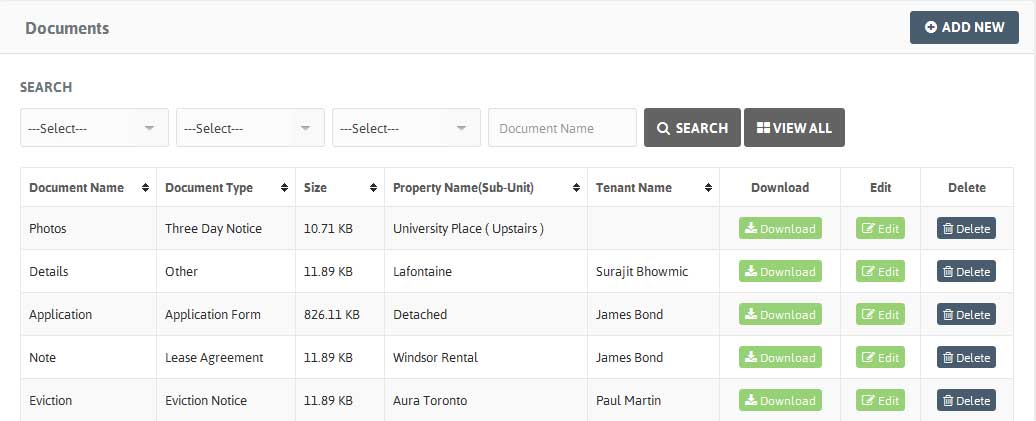
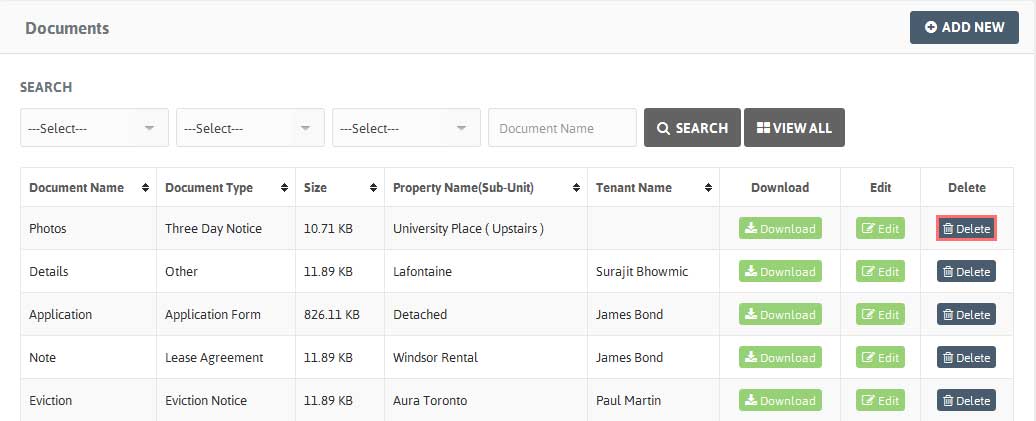
2. A table with Documents list will be shown along with Document Name, Document Type, Size, Property Name (Unit) and Tenant Name.

3. You can also sort the Document Name, Document Type, Size, Property Name (Unit), Tenant Name.

Filed Under: Documents

Download Document

May 20, 2016 by worldofrental

1. Click Tenants → Documents from the Menu.

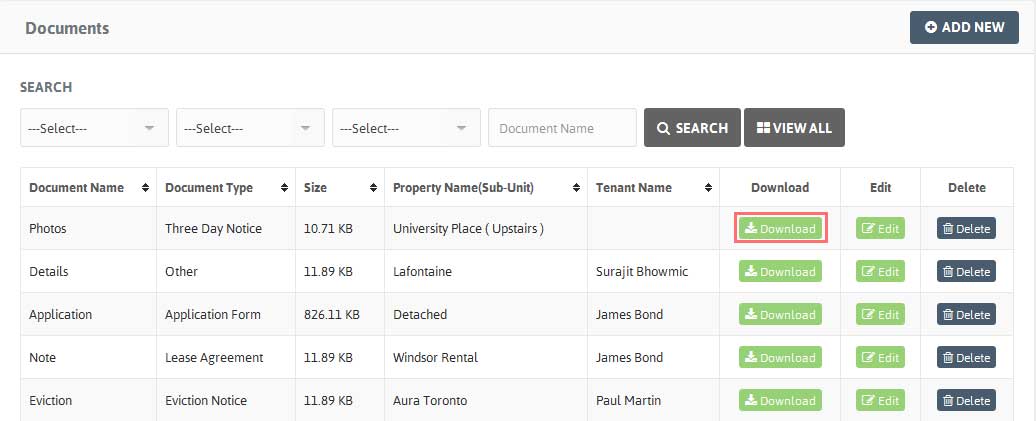
2. Select the Document you want to download, click on the ‘Download’ button under Download.

3. The document will be downloaded.

Filed Under: Documents

Edit/Delete Document

May 20, 2016 by worldofrental

Edit the Document details:

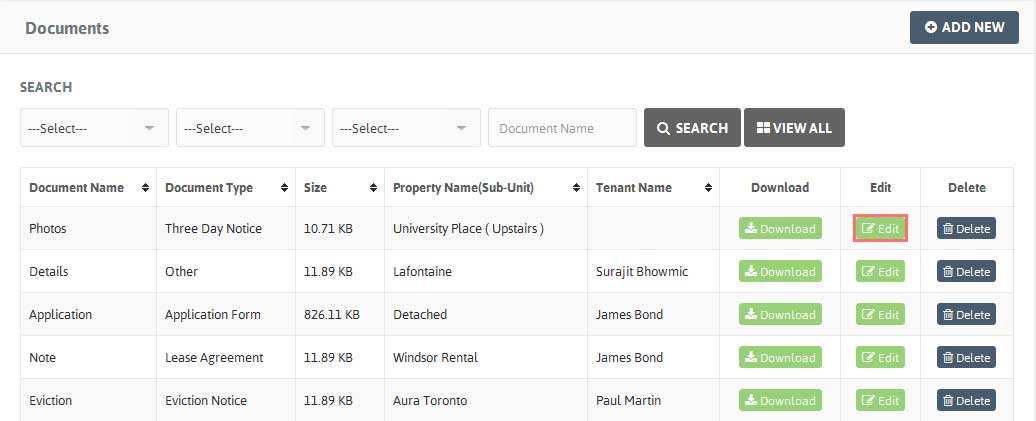
1. Click Tenants → Documents from the Menu. Choose the Document you want to edit, click on ‘Edit’ button.

2. Modify the Document details and Click ‘Save’.

Delete the Document details:

1. Click Tenants → Documents from the Menu.

2. Choose the Document you want to delete, click on arrow under Action and click ‘Delete’ button.

Filed Under: Documents

Add Applicants

May 20, 2016 by worldofrental

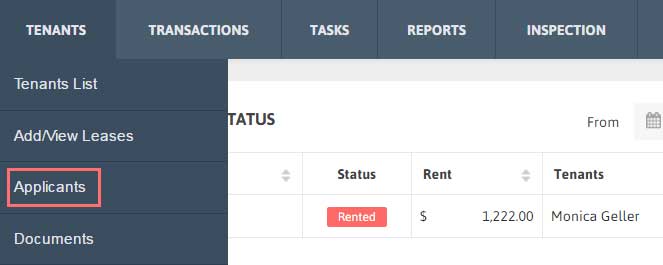
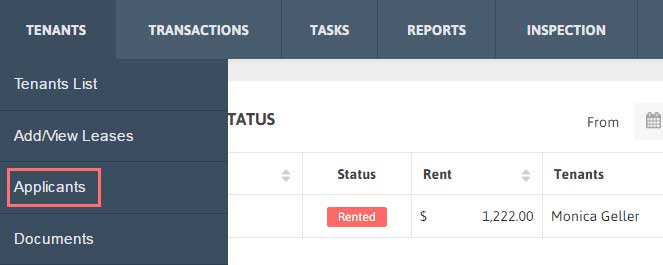
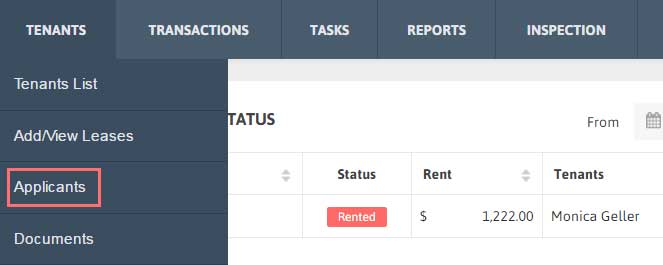
1. Click Tenants → Applicants from the Menu.

2. Click Add New.

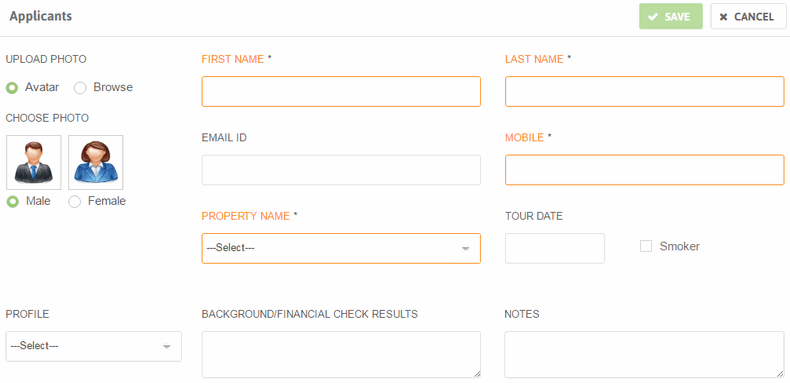
3. Fill the details of the Applicant.

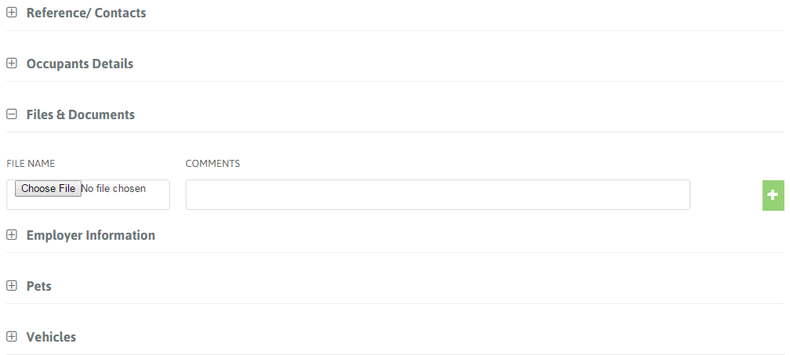
4. You can upload their Rental Application document with their details or record additional information about Applicant such as Reference, Employer info, Pets, Vehicles.

Filed Under: Applicants

View Applicants

May 20, 2016 by worldofrental

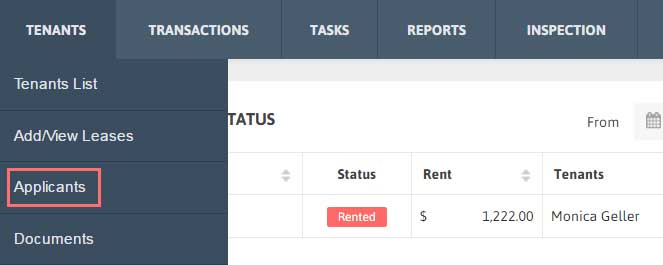
1. Click Tenants → Applicants from the Menu.

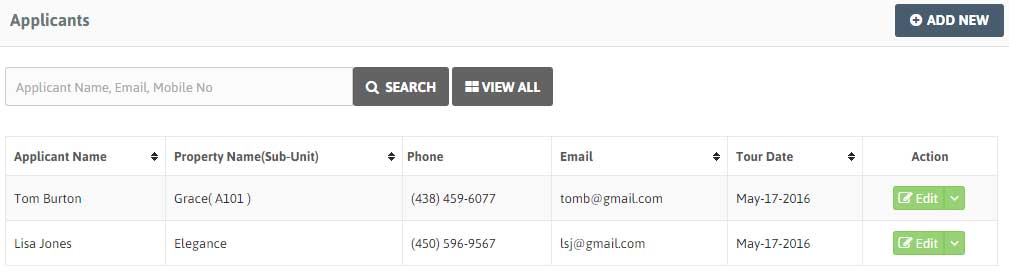
2. A table with Applicants list will be shown along with Property Name (Unit), Applicant Name, Contact No, Email and Tour Date.

3. You can also sort the Applicants, Property name, Email, Phone in ascending or descending order alphabetically or numerically.

Filed Under: Applicants

Filter/Search Applicants

May 20, 2016 by worldofrental

1. Click Tenants → Applicants from the Menu.

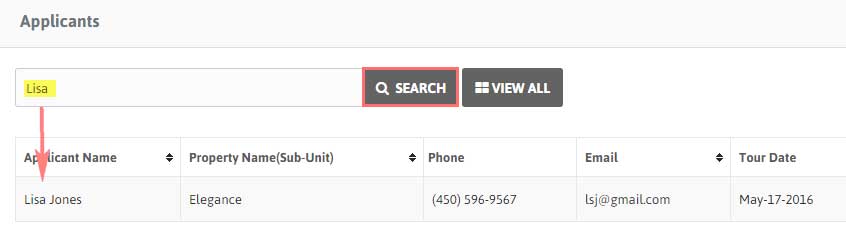
2. To search your desired Applicant just type Applicant Name, Email and/or Contact No.

3. Now click ‘Search’ to get the filtered results according to the criteria you have set in search bar.

Filed Under: Applicants

Select as Tenant

May 20, 2016 by worldofrental

1. Click Tenants → Applicants from the Menu.

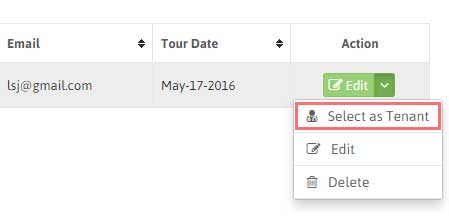
2. Click on arrow under Action and click Select as Tenant button for any applicant you want to select as tenant.

3. You will be redirected to Assign Property to Tenant form having Property Name (Unit) and Tenant Name filled in it. Fill all the remaining details.

4. Click ‘Save’. You’ll be redirected to Leases Page. Where you can see the Property name(Applicant has been selected as tenant for), Tenant’s name and contact info, email address, rent amount, status and lease period.

Filed Under: Applicants

  • « Previous Page
  • 1
  • …
  • 4
  • 5
  • 6
  • 7
  • 8
  • …
  • 10
  • Next Page »
Getting Started
    • Upgrade/downgrade your account
    • Add your first Property
    • Add Your first Tenant
    • Add your first Lease
    • Add your first Transaction
    • Add your first Task
    • Add your first Inspection
Dashboard
    • Dashboard Date Range
    • Properties Financial Status Table
    • Pie chart
    • Monthly chart
Properties
    • Add Properties
    • View Properties
    • Property Units
    • Filter Properties
    • Export/Import your Properties
    • View Tenant List for The Particular Property
    • Active/ Inactive Property Status
    • Action Tab of Property List Table
Tenants
    • Add Tenants
    • View Tenants
    • Filter/Search Tenants
    • Export/Import your Tenants details
    • View Lease details of particular Tenant
    • Invite Tenants
    • Edit/Delete Tenants
Add / View Leases
    • Add a Lease
    • View a Lease
    • Filter a Lease
    • Export a Lease
    • Edit/Delete a Lease
Applicants
    • Add Applicants
    • View Applicants
    • Filter/Search Applicants
    • Select as Tenant
    • Edit/Delete Applicant
Documents
    • Add Document
    • View Document
    • Download Document
    • Edit/Delete Document
Tenants With Access
    • Re-invite Tenant
    • Disable Access for Tenant
Tenants Assessment
    • View the Reports
    • Filter/Search the Reports
    • Export the Reports
Useful Links
    • Useful Links
Transactions
    • Add Transactions
    • View Transactions
    • Filter/Search Transactions
    • Export your Transactions data
    • E-signed Receipt email option
    • Edit/Delete Transaction
    • Mark as Unpaid
Recurring Transactions
    • Add Recurring Transaction
    • View Recurring Transaction
    • Filter/Search Recurring Transaction
    • Export Recurring Transaction data
    • Edit/Use/Delete Recurring Transaction
Transactions Types
    • Add Transactions Types
    • View Transactions Types
    • Edit/Delete Transactions Types
Tasks
    • Add Tasks
    • View Tasks
    • Filter/Search Tasks
    • Export Tasks
    • Edit/Delete Tasks
Recurring Tasks
    • Add Recurring Task
    • View Recurring Task
    • Filter/Search Recurring Task
    • Edit/Delete Recurring Task
Reports
    • Rent Lease Status Report
    • Financial Report
Inspection
    • Add Inspection
    • View Inspection
    • Filter/Search Inspection
    • Export Inspection Data
    • Edit/Delete Inspection
Support
    • Feedback/Feature Request
    • Support Ticket
Notifications
    • View Alerts
    • Filter Alerts
    • Email to Tenant
Manage Account
    • Upgrade/downgrade your account
    • Payment Details
    • Cancel the Account
    • Re-activate Account/Service
My Profile
    • Update your Profile
    • Update Password
    • Sign out of all devices
Contacts/Vendors
    • Contacts/Vendors
Security
    • Two Step Verification
    • Forgot your Backup code?
Product
  • Features
  • Pricing
  • Sign up
  • App for Android
  • App for iOS
Company
  • About us
  • Investors
  • Refund Policy
  • Contact
Support
  • FAQ's
  • Blog
  • Security
Social Media links
  • Facebook
  • Twitter
  • you tube
  • Google plus
  • Pinterest
  • Tumblr
  • instagram
  • Stumble

Copyright ©2025-2026 World of Rental, Inc. All rights reserved. Read our Privacy Policy & Terms of Service. | WorldofRental.com is owned and operated by Rootways Inc.

TOP