
logo

World of Rental Help Center

Exact matches only
Search in title
Search in content
Search in posts
Search in pages
Filter by Categories
Add / View Leases
Applicants
Contacts/Vendors
Dashboard
Documents
Getting Started
Inspection
Manage Account
My Profile
Notifications
Properties
Recurring Tasks
Recurring Transactions
Reports
Security
Support
Tasks
Tenants
Tenants Assessment
Tenants with Access
Transactions
Transactions Types
Useful Links
Home » Properties » Export/Import your Properties

Export/Import your Properties

May 19, 2016 by worldofrental

Export your Properties:

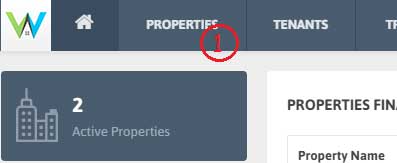
1. Click Properties from the Menu.
2. To export all your Properties with its details, click ‘Export’ button.

3. You can also Export particular Property by filtering the list.

Import your Properties:

1. It is faster to import data into World of Rental than to enter it manually if you have lots of Properties to add.

2. When you import data, it’s really important to import it in the correct order and format.

3. For each import file that’s required, use the exported file as a template file.

4. We recommend importing in specific order; hence export a file, use it as template and complete the data import.

5. World of Rental offers an Excel (.xls) template for each data import type. The data import process is very particular about the formats used in the file.

6. Once the file is complete and saved to your computer, click ‘Import’ and select the file.

7. Click the ‘Open’ button. The page will refresh and you’ll see the new data.

Filed Under: Properties

Getting Started
    • Upgrade/downgrade your account
    • Add your first Property
    • Add Your first Tenant
    • Add your first Lease
    • Add your first Transaction
    • Add your first Task
    • Add your first Inspection
Dashboard
    • Dashboard Date Range
    • Properties Financial Status Table
    • Pie chart
    • Monthly chart
Properties
    • Add Properties
    • View Properties
    • Property Units
    • Filter Properties
    • Export/Import your Properties
    • View Tenant List for The Particular Property
    • Active/ Inactive Property Status
    • Action Tab of Property List Table
Tenants
    • Add Tenants
    • View Tenants
    • Filter/Search Tenants
    • Export/Import your Tenants details
    • View Lease details of particular Tenant
    • Invite Tenants
    • Edit/Delete Tenants
Add / View Leases
    • Add a Lease
    • View a Lease
    • Filter a Lease
    • Export a Lease
    • Edit/Delete a Lease
Applicants
    • Add Applicants
    • View Applicants
    • Filter/Search Applicants
    • Select as Tenant
    • Edit/Delete Applicant
Documents
    • Add Document
    • View Document
    • Download Document
    • Edit/Delete Document
Tenants With Access
    • Re-invite Tenant
    • Disable Access for Tenant
Tenants Assessment
    • View the Reports
    • Filter/Search the Reports
    • Export the Reports
Useful Links
    • Useful Links
Transactions
    • Add Transactions
    • View Transactions
    • Filter/Search Transactions
    • Export your Transactions data
    • E-signed Receipt email option
    • Edit/Delete Transaction
    • Mark as Unpaid
Recurring Transactions
    • Add Recurring Transaction
    • View Recurring Transaction
    • Filter/Search Recurring Transaction
    • Export Recurring Transaction data
    • Edit/Use/Delete Recurring Transaction
Transactions Types
    • Add Transactions Types
    • View Transactions Types
    • Edit/Delete Transactions Types
Tasks
    • Add Tasks
    • View Tasks
    • Filter/Search Tasks
    • Export Tasks
    • Edit/Delete Tasks
Recurring Tasks
    • Add Recurring Task
    • View Recurring Task
    • Filter/Search Recurring Task
    • Edit/Delete Recurring Task
Reports
    • Rent Lease Status Report
    • Financial Report
Inspection
    • Add Inspection
    • View Inspection
    • Filter/Search Inspection
    • Export Inspection Data
    • Edit/Delete Inspection
Support
    • Feedback/Feature Request
    • Support Ticket
Notifications
    • View Alerts
    • Filter Alerts
    • Email to Tenant
Manage Account
    • Upgrade/downgrade your account
    • Payment Details
    • Cancel the Account
    • Re-activate Account/Service
My Profile
    • Update your Profile
    • Update Password
    • Sign out of all devices
Contacts/Vendors
    • Contacts/Vendors
Security
    • Two Step Verification
    • Forgot your Backup code?
Product
  • Features
  • Pricing
  • Sign up
  • App for Android
  • App for iOS
Company
  • About us
  • Investors
  • Refund Policy
  • Contact
Support
  • FAQ's
  • Blog
  • Security
Social Media links
  • Facebook
  • Twitter
  • you tube
  • Google plus
  • Pinterest
  • Tumblr
  • instagram
  • Stumble

Copyright ©2025-2026 World of Rental, Inc. All rights reserved. Read our Privacy Policy & Terms of Service. | WorldofRental.com is owned and operated by Rootways Inc.

TOP
